Military Army Tycoon controls
Standard Roblox R6 input plus how to click pads, deploy a squad, and read blue versus red outlines in close quarters.
Battle Action has not published a custom keybind bible for Military Army Tycoon. Place 95409544559668 is still a Roblox Simulation / Tycoon with R6 avatars, so the first hour runs on default Roblox input plus whatever HUD the studio stacked on top. This page documents that honestly. We will not invent hotkeys, ability names, or a vehicle-specific control list copied from InfinityInteractive’s Military Tycoon. If a thumbnail shows a country-select wheel or an F-35 cockpit overlay, you are in the wrong guide.
Use this after getting started. Join Battle Action for the group boost before you worry about camera polish. Codes will not remap your keys; the codes hub is empty as of 31 August 2026 anyway.
PC defaults (what actually works)
On keyboard and mouse you are in ordinary Roblox movement:
- WASD walk the plot and the desert canyon.
- Space jump pads, ledges, and canyon lips.
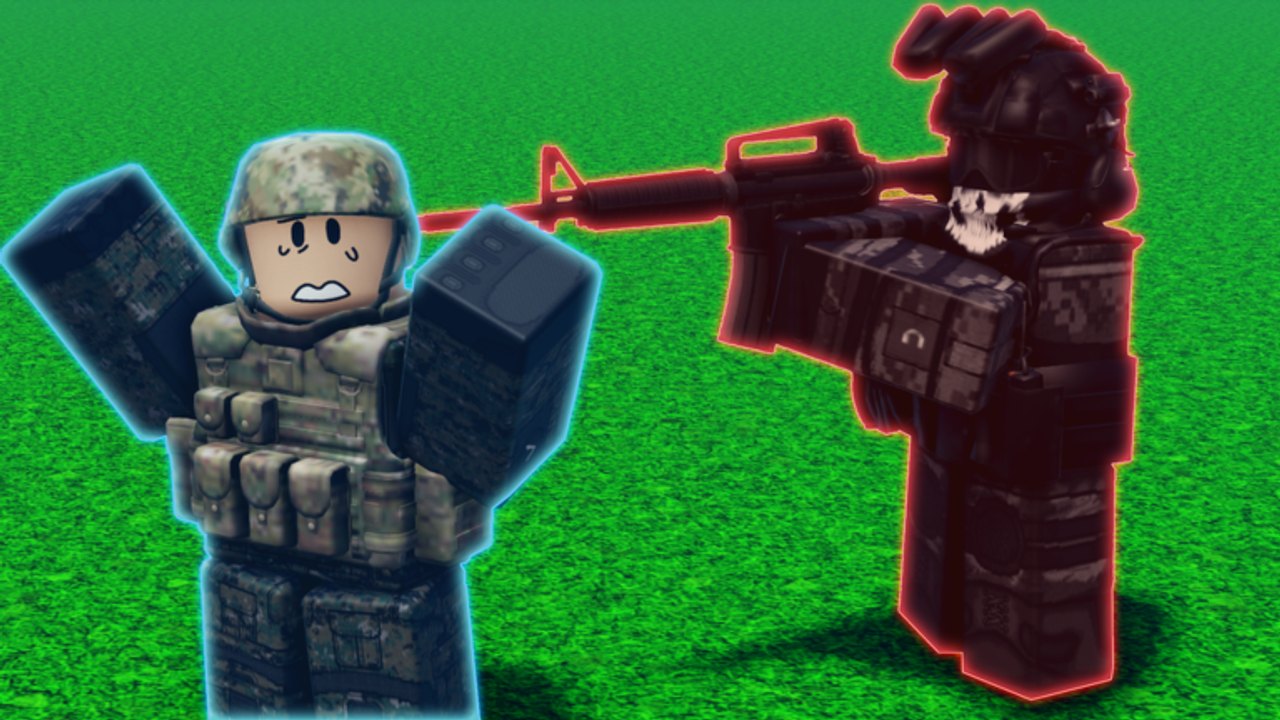
- Mouse look. Combat shots in the official gallery are close-quarters; keep the camera low enough to see blue ally outlines versus red enemy outlines before you click.
- Left click interacts with tycoon buttons on the floor and fires once you have a weapon equipped. Walk onto a pad, look at it, click. If nothing buys, you cannot afford it — that is a cash problem, not a bind problem.
- Shift (if enabled in Roblox settings) is sprint or shift-lock. Shift-lock helps when you are aiming at a red outline in a corner. Turn it off if it makes pad-clicking miserable.
There is no documented unique “deploy army” key. Sending troops is a world action: unlock a squad on the plot using how to build an army, then walk that mix toward a location as described in how to capture. If a future patch adds a dedicated deploy hotkey, it will be noted on the launch recap, not invented here.
Mobile
Thumbstick left, camera drag right, jump button, and a fire button when a weapon is equipped. Rotate to landscape if the next tycoon pad or shop rail is clipped by the portrait HUD. Pinch-zoom if the canyon fight is too tight to read outlines. Do not blame the economy because a portrait HUD hid the cheapest squad button; the starter checklist still assumes you can see the pads. Use the in-app browser or a split view if you ever paste a real code from the codes list — typing long strings on a software keyboard is how people fat-finger invalid claims.
Console
Left stick move, right stick look, face button jump, trigger or face button interact depending on Roblox’s current gamepad map. Open the on-screen keyboard from shop or gift UI if a redeem field ever appears. You do not need a physical keyboard to play the tycoon loop. If the cursor fights the camera while you try to click a pad, stop aiming and stand on the pad first, then interact. Confirm you are in Battle Action’s listing via official links before you remap around a different game’s HUD.
Combat camera, not mil-sim HUD
Official close-quarters art puts a camouflage rifleman against a black-ops enemy with a red laser. Blue outline = ally. Red outline = contest. Read that before you dump a magazine. Long desert-canyon sightlines punish a locked-up camera on a ridge. Interiors punish a zoomed-out sky camera that cannot see corners. You are commanding a mix, not filming a trailer of Humvees, tanks, APCs, and a green tiltrotor.
If fights feel unfair, check composition on the squad rankings and army composition rankings after you can actually aim. Input will not save a trophy pad with no recapture squad. Session structure is still how to play: fund, deploy, convert. Starter builds and progression tell you what to click, not which key to mash.
Accessibility and session hygiene
- Enable Roblox camera sensitivity you can actually track. High sensitivity plus canyon ridges equals missed outlines.
- Turn on shift-lock only for CQC, off for pad shopping.
- Autosave means you can leave if the HUD is unreadable and come back after a settings pass. The plot stays.
- Six-player servers will not pause while you open Roblox settings. Park on your own plot first.
- Like the game if you want updates. Liking is not a control unlock.
The guides hub is the rest of the reading map. Input is the boring layer underneath. Master move, look, click, deploy — then spend the hour on the army, not on a bind myth from another tycoon.
If the HUD hides the next tycoon button on a phone, rotate to landscape before you blame the economy. Military Army Tycoon is still a Roblox R6 controller: move, look, click, deploy. Master that, then worry about army theory.
Frequently Asked Questions
Quick answers for new commanders.
Did Battle Action publish a unique keybind list?
No. Use default Roblox R6 movement, camera, jump, and click-to-buy pads. We will not invent hotkeys.
How do I send troops to a capture point?
Unlock a squad on the plot, then walk the mix to a location. There is no documented special deploy key. See how to capture.
Why can’t I click the next pad on mobile?
Portrait HUDs often clip tycoon buttons. Rotate to landscape, stand on the pad, then tap. If it still fails, you cannot afford it — check how to get cash.
What do blue and red outlines mean in a fight?
Official close-quarters shots show blue-outlined allies versus red-outlined black-ops enemies. Do not fire on blue.
Are vehicle controls like the other Military Tycoon’s jets and bunkers?
No. This wiki will not import F-35 or bunker binds from InfinityInteractive. Confirm the place on the official links page.