Military Army Tycoon guides
A reading map for the first plot, the group boost, mixed armies, and captures on six-player servers.
Military Army Tycoon is the Battle Action Roblox tycoon that launched on 15 August 2026 (place 95409544559668). You claim a plot, build a military base from the ground up, unlock soldier squads, equip weapons, expand and upgrade that base, then send troops to capture strategic locations and fight enemy armies. This hub is the index for that loop. It is not a mirror of InfinityInteractive’s Military Tycoon. Guides that tell you to pick a country, farm diamonds, sit on an oil rig, or chase an F-35 bunker line belong to the other game.
If the plot is still empty, open the beginner walkthrough first and claim the Battle Action group boost before you spend. Then read the session loop so the tycoon is not just an AFK collector. Cash, army composition, and captures each fail for different reasons, so they each have a page. The codes list stays bookmarked even though no public promo string is confirmed as of 31 August 2026.
First-hour reading order
- Getting started — confirm the place ID, join the group, walk the first buttons.
- Starter checklist — a shorter punch list if you already spawned.
- How to get cash — spend rules, not rumor codes.
- How to build an army and a starter army build.
- How to capture — why empty flags lose six-player servers.
- Controls — movement, camera, and HUD on PC, mobile, and console.
- how to protect — hold the plot and flags you already took.
- how to beat — beat mixed armies on six-player servers.
- map — desert-canyon layout and capture geography.
- review — what shipped versus what thumbnail accounts invented.
After that hour, the soldier squad rankings and army composition rankings help you stop buying random buttons. Long-term spend order lives on progression. What actually shipped at launch is on the launch recap. Official Roblox and group URLs sit on the official links page.
What each guide is for
| Guide | Open it when |
|---|---|
| Getting started | First join, wrong-game confusion, unclaimed group boost |
| How to play | You own a cheap squad and need the build-deploy-capture loop |
| How to get cash | Buttons feel too expensive or you are hunting fake codes |
| How to build an army | One expensive unlock is eating the whole plot |
| How to capture | You AFK the plot while flags flip |
| Controls | Camera, deploy clicks, or mobile HUD are fighting you |
| how to protect | Flags you took start flipping back |
| how to beat | Mixed armies on six-player servers keep winning the fight |
| map | You need canyon geography, not a rumor layout |
| review | You want a verdict on what shipped versus thumbnail fantasy |
Getting started is onboarding. How to play is the loop after onboarding. Cash is tempo: production from the base you expand, the group gift, and why diamond-code lists waste a session. Build army is composition: squads, then weapons, then a mix that can take a flag. Capture is taking ground. Protect is holding it. Beat is winning the fight. Map is geography. Review is the verdict after you have buttons. Controls is input. Ranked pages are not walkthroughs; use them after you understand the buttons.
What the official screenshots actually show
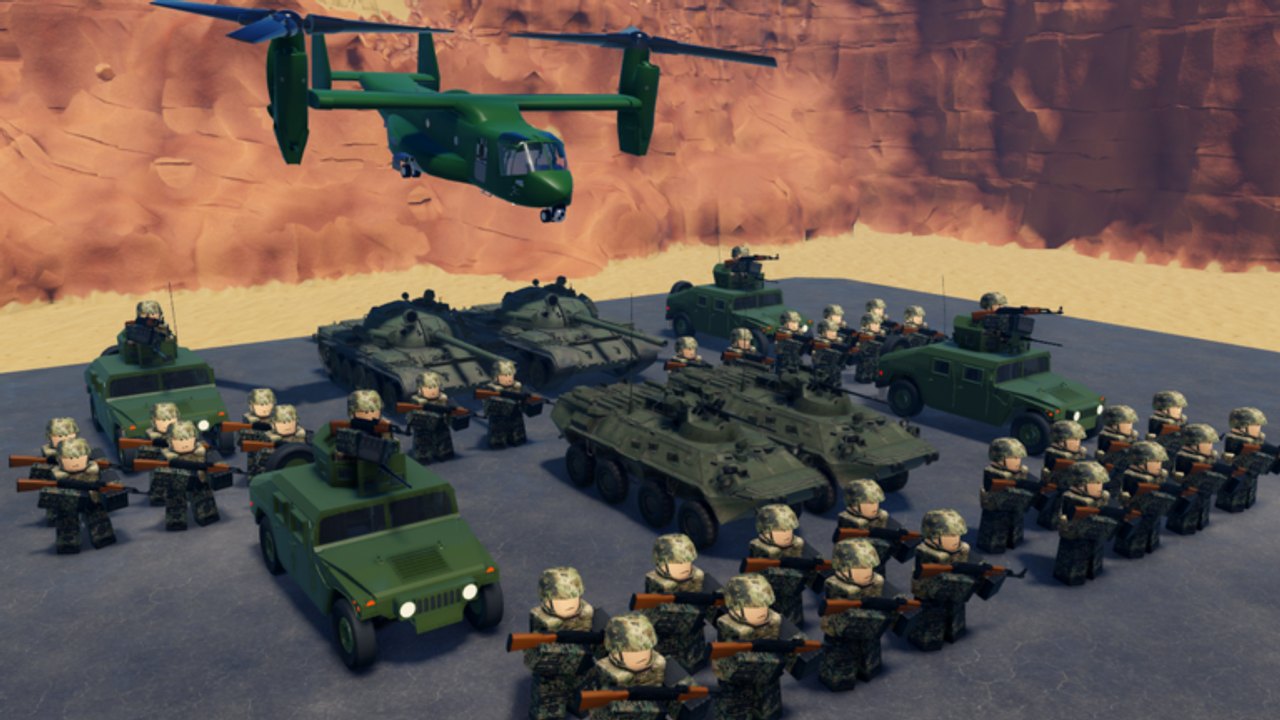
Battle Action’s gallery is camouflage infantry, Humvees, tanks, APCs, and a green tiltrotor that reads like an Osprey, usually lined up in a desert canyon. Close-quarters shots put a blue-outlined ally against a red-outlined black-ops rifleman. Use that language to identify friend and foe. Do not treat screenshot vehicles as a published shop tree with invented model names or stats. This wiki will not invent squad names, weapon SKUs, or promo codes that Battle Action has not posted.
Servers hold six players. Progress saves automatically. Avatars use R6. The genre tags are Simulation / Tycoon. The experience already sits near 1.1 million visits with several thousand concurrent players, so public servers are contested. You cannot AFK the plot and expect every flag to stay yours.
After a patch
Re-read the launch notes first, then only the guide that matches what changed: cash if prices moved, army if new squad buttons appeared, capture if the layout shifted, controls if HUD icons moved. The starter checklist is the fastest audit of a live save. If a thumbnail mixes oil rigs, country flags, or diamond counters into this title, close it.
When you have ten minutes and a fresh plot, open getting started, claim the group boost, buy the cheapest squad you can support, then leave this hub and deploy. These articles exist so that first hour is not spent inside the wrong game’s wiki.
Frequently Asked Questions
Quick answers for new commanders.
Which Military Army Tycoon guide should I read first?
Start with getting started, claim the group boost, then follow how to play instead of hunting codes.
Is this the same as Military Tycoon by InfinityInteractive?
No. This hub covers Battle Action’s Military Army Tycoon (place 95409544559668). Country picks, oil rigs, diamonds, and F-35 bunker lines are the other game.
Are there working promo codes for this title?
No public promo string is confirmed as of 31 August 2026. Use the group boost and watch the codes hub.
Does progress save if I leave mid-guide?
Yes. The official description states progress saves automatically. You can close Roblox and continue the same base.
Where do squad rankings and starter builds live?
Walkthroughs stay here. Rankings are on the squad tier list and composition list. Spend order is on best builds and progression.